
Mastering Dictionary Counting in Python: Frequency Analysis Every Data Scientist Must Know
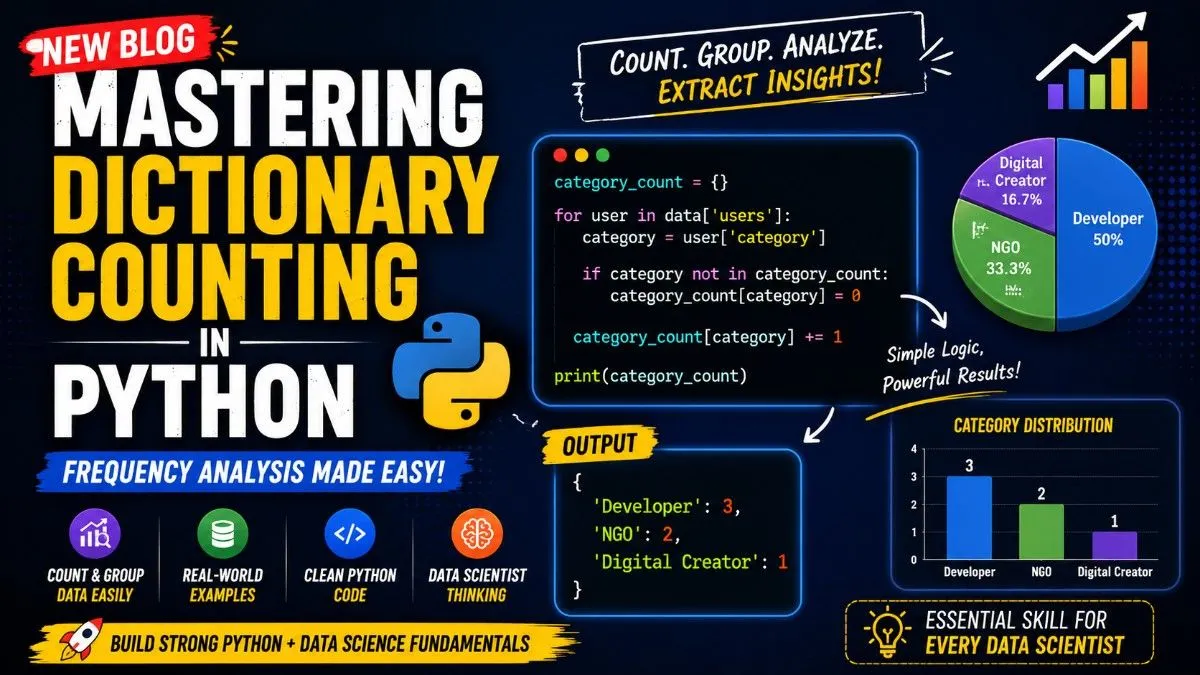
If you want to become strong in Data Science, one of the most important skills you must deeply understand is Dictionary Counting in Python.
Most beginners jump directly into Machine Learning, AI, or advanced libraries. But real Data Scientists spend a huge amount of time working with raw data, grouping values, counting frequencies, analyzing categories, and extracting meaningful insights.
Dictionary counting is one of the strongest foundations for building analytical thinking in Python.
In this blog, you will learn:
- What dictionary counting is
- Why Data Scientists use it
- How frequency analysis works
- How loops and memory work together
- How dictionaries store dynamic keys
- Real-world examples
- Interview-level logic
- Professional Data Science thinking
If you deeply understand this concept, you can solve many real-world analytics problems.
What is Dictionary Counting in Python?
Dictionary counting means storing values as keys and increasing their frequency as you scan data.
It helps answer questions like:
- How many users belong to each category?
- How many customers are from each country?
- How many products belong to each type?
- How many hashtags were used?
- Which category appears most often?
This is called Frequency Analysis.
Real-World Dataset Example
Suppose we have Instagram-style raw data:
data = {
    "users": [
        {"name": "Amit", "category": "Developer"},
        {"name": "Priya", "category": "NGO"},
        {"name": "Rahul", "category": "Developer"},
        {"name": "Sara", "category": "Digital Creator"},
        {"name": "Rohan", "category": "Developer"},
        {"name": "Neha", "category": "NGO"}
    ]
}
Now we ask:
How many users belong to each category?
Expected output:
{
    "Developer": 3,
    "NGO": 2,
    "Digital Creator": 1
}
This is exactly what frequency counting solves.
Why Dictionary Counting Matters in Data Science
Real Data Scientists constantly perform grouping and counting.
Examples:
Count Customers by Country
India → 1200
USA → 700
UK → 300
Count Products by Category
Laptop → 450
Phone → 800
Tablet → 150
Count Fraud Cases by Type
Card Fraud → 75
Loan Fraud → 20
Identity Fraud → 40
Count Social Media Users by Category
Developer → 500
Creator → 250
NGO → 90
Same logic everywhere.
The Core Python Code
category_count = {}

for user in data['users']:
    category = user['category']

    if category not in category_count:
        category_count[category] = 0

    category_count[category] += 1

print(category_count)
Now let’s break it deeply.
Step 1: Create an Empty Dictionary
category_count = {}
This creates an empty dictionary.
Think of it like a memory box.
Right now:
{}
No categories stored yet.
We are saying:
“I will store category names and how many times they appear.”
Step 2: Loop Through Every User
for user in data['users']:
This means:
Take one user at a time.
Loop order:
- Amit
- Priya
- Rahul
- Sara
- Rohan
- Neha
Important:
user changes every iteration.
Step 3: Extract Current Category
category = user['category']
Take category from current user.
Example:
For Amit:
{
    "name": "Amit",
    "category": "Developer"
}
So:
category = "Developer"
Now we store this temporarily.
Step 4: Check If Category Exists
if category not in category_count:
Ask:
Does this category already exist inside dictionary memory?
Current dictionary:
{}
No.
So we create it.
Step 5: Initialize Count
category_count[category] = 0
Equivalent to:
category_count["Developer"] = 0
Now dictionary becomes:
{
    "Developer": 0
}
Why 0?
Starting count.
Step 6: Increase Count
category_count[category] += 1
Equivalent to:
category_count["Developer"] += 1
Now:
0 + 1 = 1
Dictionary becomes:
{
    "Developer": 1
}
Amit counted.
Full Iteration Breakdown
Iteration 1 → Amit
Category:
Developer
Dictionary:
{
    "Developer": 1
}
Iteration 2 → Priya
Category:
NGO
New key.
Dictionary:
{
    "Developer": 1,
    "NGO": 1
}
Iteration 3 → Rahul
Category:
Developer
Already exists.
Increase count.
Dictionary:
{
    "Developer": 2,
    "NGO": 1
}
Iteration 4 → Sara
Category:
Digital Creator
Dictionary:
{
    "Developer": 2,
    "NGO": 1,
    "Digital Creator": 1
}
Iteration 5 → Rohan
Developer again.
Dictionary:
{
    "Developer": 3,
    "NGO": 1,
    "Digital Creator": 1
}
Iteration 6 → Neha
NGO again.
Final dictionary:
{
    "Developer": 3,
    "NGO": 2,
    "Digital Creator": 1
}
Done.
Biggest Beginner Confusion: Does Dictionary Reset?
No.
Why?
Because dictionary was created outside the loop.
category_count = {}
Runs only once.
Then loop updates same dictionary memory.
That’s why Python “remembers” previous values.
This is a major Python concept.
Dynamic Keys: Deep Understanding
This line:
category_count[category]
Confuses many beginners.
Suppose:
category = "Developer"
Then:
category_count[category]
becomes:
category_count["Developer"]
So Python dynamically uses variable value as key.
That’s powerful.
Visual Memory Trick
Think of dictionary like a tally sheet.
See Developer:
Developer → 1
See NGO:
Developer → 1
NGO → 1
See Developer again:
Developer → 2
NGO → 1
See Digital Creator:
Developer → 2
NGO → 1
Digital Creator → 1
This is frequency tracking.
Cleaner Python Method Using .get()
Professional Python often uses:
category_count = {}

for user in data['users']:
    category = user['category']
    category_count[category] = category_count.get(category, 0) + 1

print(category_count)
Cleaner and shorter.
How .get() Works
If key exists:
category_count.get("Developer", 0)
Returns:
3
If key doesn’t exist:
category_count.get("Doctor", 0)
Returns:
0
Then +1.
Very common in real-world Python.
Real Data Science Use Cases
Count Users by Country
country_count = {}

for user in users:
    country = user['country']
    country_count[country] = country_count.get(country, 0) + 1
Output:
{
    "India": 500,
    "USA": 250,
    "UK": 120
}
Count Product Types
product_count = {}

for product in products:
    category = product['category']
    product_count[category] = product_count.get(category, 0) + 1
Count Hashtags
hashtags = ["ai", "python", "ai", "ml", "python"]

count = {}

for tag in hashtags:
    count[tag] = count.get(tag, 0) + 1
Output:
{
    "ai": 2,
    "python": 2,
    "ml": 1
}
This is heavily used in NLP, social media analytics, and recommendation systems.
Interview-Level Question
Which category is largest?
largest = max(category_count, key=category_count.get)

print(largest)
Output:
Developer
Why?
Because Developer has highest count.
This is frequency-based ranking.
Full Final Python Code
data = {
    "users": [
        {"name": "Amit", "category": "Developer"},
        {"name": "Priya", "category": "NGO"},
        {"name": "Rahul", "category": "Developer"},
        {"name": "Sara", "category": "Digital Creator"},
        {"name": "Rohan", "category": "Developer"},
        {"name": "Neha", "category": "NGO"}
    ]
}

category_count = {}

for user in data['users']:
    category = user['category']
    category_count[category] = category_count.get(category, 0) + 1

print(category_count)

largest = max(category_count, key=category_count.get)

print("Largest Category:", largest)
Output:
{
    "Developer": 3,
    "NGO": 2,
    "Digital Creator": 1
}

Largest Category: Developer
Data Scientist Thinking Framework
Whenever you see data, ask:
Numerical?
Use:
- max()
- min()
- average
- median
Categorical?
Use:
- count
- group
- frequency
- deduplication
Relationships?
Use:
- joins
- graph logic
- recommendations
Dirty Data?
Use:
- cleaning
- null handling
- duplicate removal
This is how strong Data Scientists think.
Final Thoughts
Dictionary counting in Python is not just syntax.
It teaches:
- Loop memory
- Dynamic keys
- Grouping
- Frequency analysis
- Data aggregation
- Real-world analytics logic
- Scalable thinking
If you deeply understand this concept, your Python and Data Science foundation becomes much stronger.
This is real Data Scientist brain-building logic.