
Parsing Raw Text Files into Structured Data Using Pure Python: Complete Data Scientist Guide
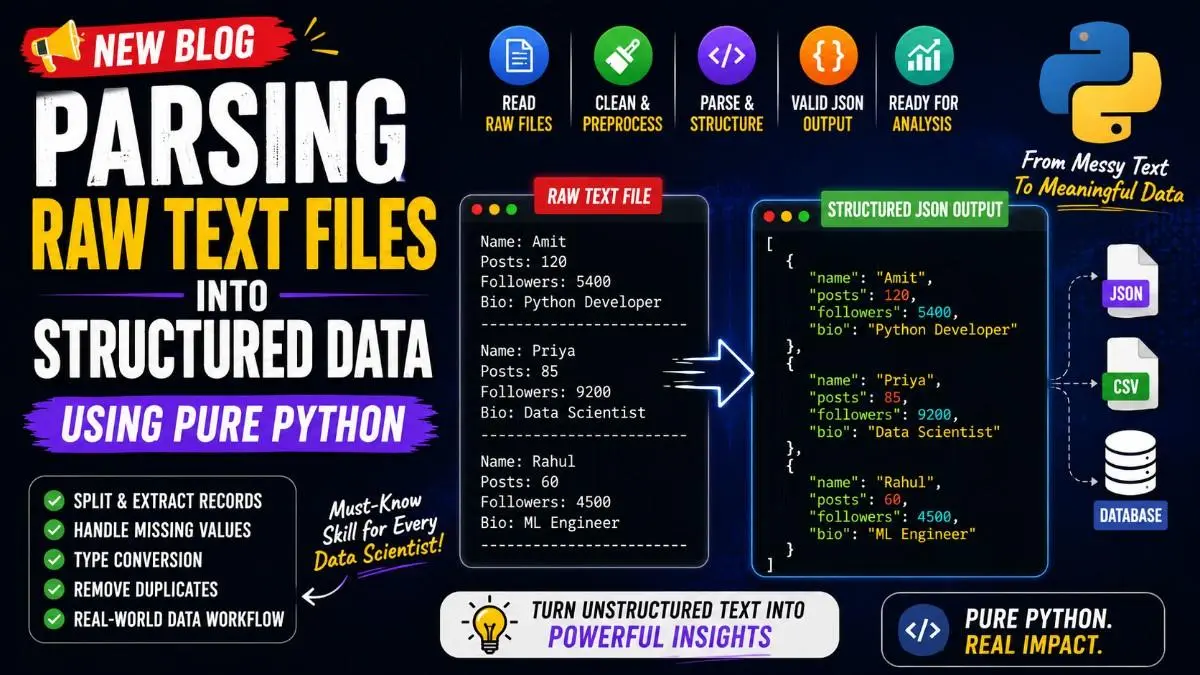
Raw data is rarely clean. In the real world, Data Scientists often work with messy text files, logs, scraped data, chat exports, or unstructured social media data. Before performing analysis, machine learning, or visualization, this raw information must be converted into structured and meaningful data.
This process is called Data Parsing.
If you want to become strong in Python and Data Science, learning how to convert rough text into valid JSON or structured datasets is one of the most important real-world skills.
In this guide, we will deeply understand how to parse rough text files using Pure Python and build strong Data Scientist thinking.
What is Data Parsing?
Parsing means taking raw unstructured text and converting it into structured usable data.
Raw text is hard for machines to analyze.
Example raw text file:
Name: Amit
Posts: 120
Followers: 5400
Bio: Python Developer

Name: Priya
Posts: 85
Followers: 9200
Bio: Data Scientist

Name: Rahul
Posts: 60
Followers: 4500
Bio: ML Engineer
This is useful for humans but difficult for Python to analyze directly.
After parsing:
[
    {
        "name": "Amit",
        "posts": 120,
        "followers": 5400,
        "bio": "Python Developer"
    },
    {
        "name": "Priya",
        "posts": 85,
        "followers": 9200,
        "bio": "Data Scientist"
    }
]
Now the data is structured and ready for analytics.
That is parsing.
Why Parsing Matters in Data Science
Most Data Scientists do not start with perfect CSV or database data.
They often work with:
- Scraped website data
- Social media exports
- Chat logs
- API text responses
- Log files
- Emails
- Raw text reports
- Messy manual datasets
- OCR extracted text
- User-generated data
Before analysis, all this must be cleaned and structured.
Step 1: Load Raw Text File
First, we read the rough file.
with open("initialdata.txt", encoding="utf-8") as f:
    data = f.read()
What happens here?
- open() opens the file
- "utf-8" ensures correct character reading
- read() loads the full file into one string
Now:
print(data)
Output:
Name: Amit
Posts: 120
Followers: 5400
Bio: Python Developer

Name: Priya
Posts: 85
Followers: 9200
Bio: Data Scientist
This is raw text.
Step 2: Split the File into Separate Records
Each user profile is separated by an empty line.
So we split using double newline.
chunks = data.split("\n\n")
Now Python breaks the large text into smaller chunks.
Output:
[
    "Name: Amit\nPosts: 120\nFollowers: 5400\nBio: Python Developer",
    "Name: Priya\nPosts: 85\nFollowers: 9200\nBio: Data Scientist"
]
Now each chunk = one profile.
This is how Data Scientists identify record boundaries.
Step 3: Remove Empty Garbage Chunks
Real files usually have extra spaces and blank lines.
So clean them.
chunks = [c for c in chunks if len(c.strip()) > 0]
Why?
This removes useless blank records.
Before:
["Amit", "", "Priya", " "]
After:
["Amit", "Priya"]
Step 4: Parse One Profile Block
Now we convert one chunk into structured data.
Example chunk:
Name: Amit
Posts: 120
Followers: 5400
Bio: Python Developer
Create Parser Function
def parse_chunk(chunk):
    chunk = chunk.strip()
    lines = chunk.split("\n")

    name = lines[0].replace("Name: ", "")
    posts = lines[1].replace("Posts: ", "")
    followers = lines[2].replace("Followers: ", "")
    bio = lines[3].replace("Bio: ", "")

    return {
        "name": name,
        "posts": posts,
        "followers": followers,
        "bio": bio
    }
This is the core parser.
Understanding the Parser Deeply
1. Remove Extra Spaces
chunk.strip()
Before:
Name: Amit
After:
Name: Amit
2. Break into Lines
lines = chunk.split("\n")
Now:
[
    "Name: Amit",
    "Posts: 120",
    "Followers: 5400",
    "Bio: Python Developer"
]
3. Remove Labels
name = lines[0].replace("Name: ", "")
Before:
"Name: Amit"
After:
"Amit"
Same for posts, followers, bio.
Step 5: Convert Data Types
Very important.
Currently:
"120"
"5400"
These are strings.
A Data Scientist converts them into numbers.
posts = int(lines[1].replace("Posts: ", ""))
followers = int(lines[2].replace("Followers: ", ""))
Now:
120
5400
Now we can calculate.
Step 6: Parse All Profiles
Now loop through all chunks.
profiles = []

for chunk in chunks:
    user = parse_chunk(chunk)
    profiles.append(user)
Now:
print(profiles)
Output:
[
    {
        "name": "Amit",
        "posts": 120,
        "followers": 5400,
        "bio": "Python Developer"
    },
    {
        "name": "Priya",
        "posts": 85,
        "followers": 9200,
        "bio": "Data Scientist"
    }
]
Now structured.
Step 7: Save as Valid JSON
Now convert parsed data into a reusable JSON file.
import json

with open("cleaned_data.json", "w") as f:
    json.dump(profiles, f, indent=4)
Now file becomes:
[
    {
        "name": "Amit",
        "posts": 120,
        "followers": 5400,
        "bio": "Python Developer"
    }
]
This is machine-readable.
Real Data Cleaning Problems Data Scientists Solve
1. Missing Values
Raw file:
Name: Rahul
Posts: 50
Followers:
Bio: ML Engineer
Fix:
followers_text = lines[2].replace("Followers: ", "").strip()
followers = int(followers_text) if followers_text else 0
2. Invalid Numeric Formats
Raw:
Followers: 5.2k
Convert:
text = "5.2k"

if "k" in text.lower():
    followers = float(text.lower().replace("k", "")) * 1000
Output:
5200
3. Duplicate Profiles
seen = set()
clean_users = []

for user in profiles:
    if user["name"] not in seen:
        clean_users.append(user)
        seen.add(user["name"])
Useful in social media datasets.
Final Professional Parsing Script
import json

with open("initialdata.txt", encoding="utf-8") as f:
    data = f.read()

chunks = data.split("\n\n")
chunks = [c for c in chunks if len(c.strip()) > 0]


def parse_chunk(chunk):
    lines = chunk.strip().split("\n")

    name = lines[0].replace("Name: ", "").strip()

    posts = int(
        lines[1].replace("Posts: ", "").strip()
    )

    followers = int(
        lines[2].replace("Followers: ", "").strip()
    )

    bio = lines[3].replace("Bio: ", "").strip()

    return {
        "name": name,
        "posts": posts,
        "followers": followers,
        "bio": bio
    }


profiles = []

for chunk in chunks:
    user = parse_chunk(chunk)
    profiles.append(user)


with open("cleaned_data.json", "w") as f:
    json.dump(profiles, f, indent=4)

print(profiles)
How Data Scientists Think While Parsing
Strong Data Scientists always think:
Raw Data → Split → Clean → Parse → Convert → Validate → Store → Analyze
That exact workflow is used in:
- Instagram follower datasets
- OpenAI follower analysis
- Log parsing
- Web scraping
- NLP pipelines
- CSV repair
- Financial reports
- OCR text extraction
- Chat exports
- AI preprocessing
Final Insight
Parsing rough text files into structured valid JSON is one of the most practical Python skills in Data Science.
If you master this, you stop thinking like a beginner coder and start thinking like a real Data Scientist.
The moment you can take messy real-world text and transform it into structured, analyzable data, you become capable of building powerful analytics, machine learning pipelines, recommendation systems, and automation tools.
That is how strong Data Scientists are built.